Map Configuration Reference
This page documents the three constants that define a game's physical map: TILES, LOCATION_NAMES, and HEXES. All three live in the title's map.rb file as a module included by the main Game class. For the tile string syntax used in actual tile definitions (lib/engine/tile.rb), see Tile Reference.
TILES
TILES is a hash from tile number (String) to the number of copies available in the tile bank.
TILES = {
  '3'  => 2,
  '4'  => 2,
  '7'  => 4,
  '8'  => 8,
  '9'  => 7,
  '14' => 3,
  '15' => 3,
  '57' => 4,
  '58' => 2,
  '80' => 2,
  '81' => 2,
  '82' => 2,
  '83' => 2,
}.freeze
Tile numbers refer to the standard 18xx tile catalog. Run /tiles/all on your local instance to browse every available tile, or /tiles/<number> to inspect a single tile at large scale.
If a tile number is omitted from TILES, it is unavailable in the game. If the quantity is exhausted during play, the engine prevents further lays of that tile.
LOCATION_NAMES
LOCATION_NAMES maps hex coordinates to the display names shown on the map.
LOCATION_NAMES = {
  'D2'  => 'Lansing',
  'F2'  => 'Chicago',
  'H12' => 'Altoona',
  'G19' => 'New York & Newark',
  'E23' => 'Boston',
}.freeze
A hex does not need an entry here. Hexes without a location name display no label. Coordinates follow the column-row format where the column is a letter and the row is an integer (e.g. 'G19'). The exact labelling convention (odd vs even columns for pointy-top layouts) depends on the LAYOUT value.
HEXES
HEXES is a hash of hashes. The outer key is a Symbol representing the starting colour of the hex group; the inner hash maps one or more coordinates to a tile definition string.
HEXES = {
  red: {
    ['F2'] => 'offboard=revenue:yellow_40|brown_70;path=a:3,b:_0;path=a:4,b:_0;path=a:5,b:_0',
  },
  gray: {
    ['D2'] => 'city=revenue:20;path=a:5,b:_0;path=a:4,b:_0',
  },
  white: {
    %w[F4 J14 F22] => 'city=revenue:0;upgrade=cost:80,terrain:water',
    %w[B20 D4 F10] => 'town=revenue:0',
    %w[I13 D18 B12] => '',
    %w[G15 C21]    => 'upgrade=cost:120,terrain:mountain',
  },
  yellow: {
    ['G19'] => 'city=revenue:40;city=revenue:40;path=a:3,b:_0;path=a:0,b:_1;label=NY;upgrade=cost:80,terrain:water',
  },
}.freeze
Hex colours
| Colour | Meaning | Upgradeable? |
|---|---|---|
white | Empty hex or blank track | Yes |
yellow | Pre-printed yellow tile | Yes (to green) |
green | Pre-printed green tile | Yes (to brown) |
gray | Permanently fixed track or city | No |
red | Off-map revenue space | No |
Hex colour examples
White — terrain only (mountain + water upgrade cost, no track):
upgrade=cost:80,terrain:water|mountain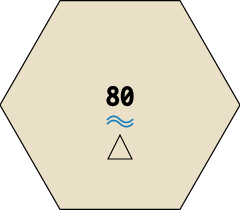
White — two unconnected towns (no paths; players lay tiles to connect them):
town=revenue:0;town=revenue:0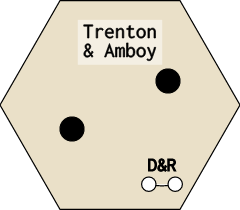
Yellow (preprinted) — two-city OO hex with water upgrade cost:
city=revenue:30;city=revenue:30;path=a:1,b:_0;path=a:4,b:_1;label=OO;upgrade=cost:40,terrain:water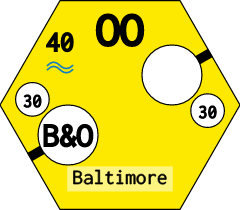
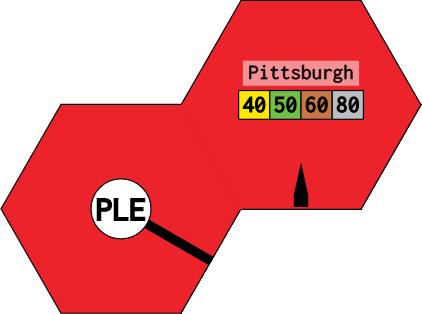
Red (offboard) — split offboard across two hexes with border and phase-keyed revenue:
- A3:
city=revenue:yellow_40|green_50|brown_60|gray_80,hide:1,groups:Pittsburgh;path=a:5,b:_0;border=edge:4 - B2:
offboard=revenue:yellow_40|green_50|brown_60|gray_80,groups:Pittsburgh;path=a:0,b:_0;border=edge:1
Grouping hexes
Multiple coordinates that share the same tile string may be grouped into an array as the key:
%w[B2 C1 E3 F4] => 'upgrade=cost:80,terrain:mountain'This is purely syntactic sugar — each coordinate gets an independent copy of the tile.
Tile definition string in HEXES
The string assigned to each coordinate is a semicolon-separated sequence of parts. Each part is a type=key:value,key:value expression. The same tile string language is used in the shared tile catalog, with the addition that HEXES strings may include upgrade= to set terrain cost and the revenue: values may be phase-specific.
Parts reference
city=
A city node (counts toward train distance; generates revenue).
| Key | Description |
|---|---|
revenue: | Revenue integer, or phase-keyed string (see below) |
slots: | Number of token slots (default 1) |
town=
A town node (counts toward train distance; generates lower revenue).
| Key | Description |
|---|---|
revenue: | Revenue integer or phase-keyed string |
boom: | If true, town generates double revenue in brown/gray phase |
offboard=
An off-map revenue space.
| Key | Description |
|---|---|
revenue: | Phase-keyed revenue string (always use phase-keyed values for offboards) |
groups: | Comma-separated group names; routes cannot use two offboards in the same group |
path=
A track segment connecting edges or nodes.
| Key | Description |
|---|---|
a: | Starting endpoint: edge number 0–5, or node reference _0, _1, … |
b: | Ending endpoint: same format as a: |
upgrade=
Terrain cost applied when a tile is laid or upgraded on this hex.
| Key | Description |
|---|---|
cost: | Extra cost in addition to the standard upgrade price |
terrain: | mountain, water, or desert; the UI shows a terrain icon |
border=
An impassable or special boundary along an edge.
| Key | Description |
|---|---|
edge: | Edge number 0–5 |
type: | impassable blocks routing through that edge |
color: | CSS colour for the border line |
label=
A city label (e.g. NY, B, OO) that restricts which tile numbers may be placed here and affects revenue bonuses in some titles.
| Key | Description |
|---|---|
| (value only) | Label string: label=NY, label=OO, label=B |
icon=
A decorative icon rendered inside the hex.
| Key | Description |
|---|---|
image: | Path under public/icons/ |
name: | Display name shown on hover |
Phase-keyed revenue
Revenue values that change by phase use the format <colour>_<value>|<colour>_<value>:
revenue:yellow_30|green_40|brown_60|gray_80This is most commonly used for offboard hexes and some gray cities.
Edge numbering
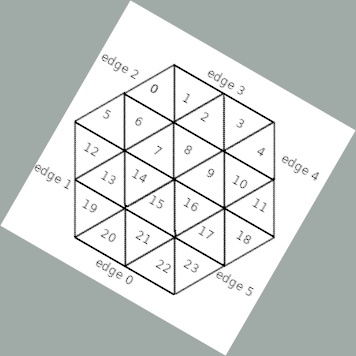
Edges are numbered 0–5 starting from the top-right and going clockwise. The exact orientation depends on LAYOUT:
Pointy-top hexagon (:pointy) — most North American titles
Flat-top hexagon (:flat) — used in some European titles
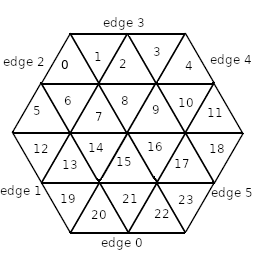
Node references (_0, _1, …) in the diagrams above correspond to city or town nodes in the order they appear in the tile string, counting from zero.
LAYOUT
LAYOUT specifies the hexagon orientation:
LAYOUT = :pointy   # Pointy-top (most common)
# or
LAYOUT = :flat     # Flat-top
The value affects edge numbering, adjacency calculations, and the coordinate system used in HEXES and LOCATION_NAMES.
Hex Coordinate System
Coordinates combine a column letter and a row number. In :pointy layout, columns advance left-to-right and rows top-to-bottom, with odd and even columns offset by half a hex vertically:
A1  B2  C1  D2  E1
    A3  B4  C3  D4
A5  B6  C5  D6  E5
The starting point and step increment depend on the map's dimensions. Inspect existing map.rb files (/tiles/<game_title>/all renders them) to calibrate your coordinate grid.
Preprinted vs Blank Hexes
Hexes listed under white with an empty string ('') are fully blank — no track, city, or town. They are upgradeable but have no starting content:
%w[C3 D2 E5] => ''Hexes with a city= or town= string but no path= parts show a revenue node with no track connections. Corporations may lay tiles to connect these nodes during the Operating Round.
Hexes listed under gray or red are fixed for the entire game. Their tile strings define permanent routing and revenue without upgrade= constraints.
What's Next
- Tile string DSL full reference: Tile Reference
- CORPORATIONS, COMPANIES, TRAINS, PHASES schemas: Entities Reference
- Step-by-step implementation guide: Game Implementation
Version: 2026-05-08 — derived from lib/engine/game/g_1830/map.rb, lib/engine/hex.rb, lib/engine/tile.rb.