Eight-channel generative groovebox Raspberry Pi 4 · Zynthian · Maschine MK2
You steer the pattern.
You never draw it.
Watch it play,
with nobody touching it
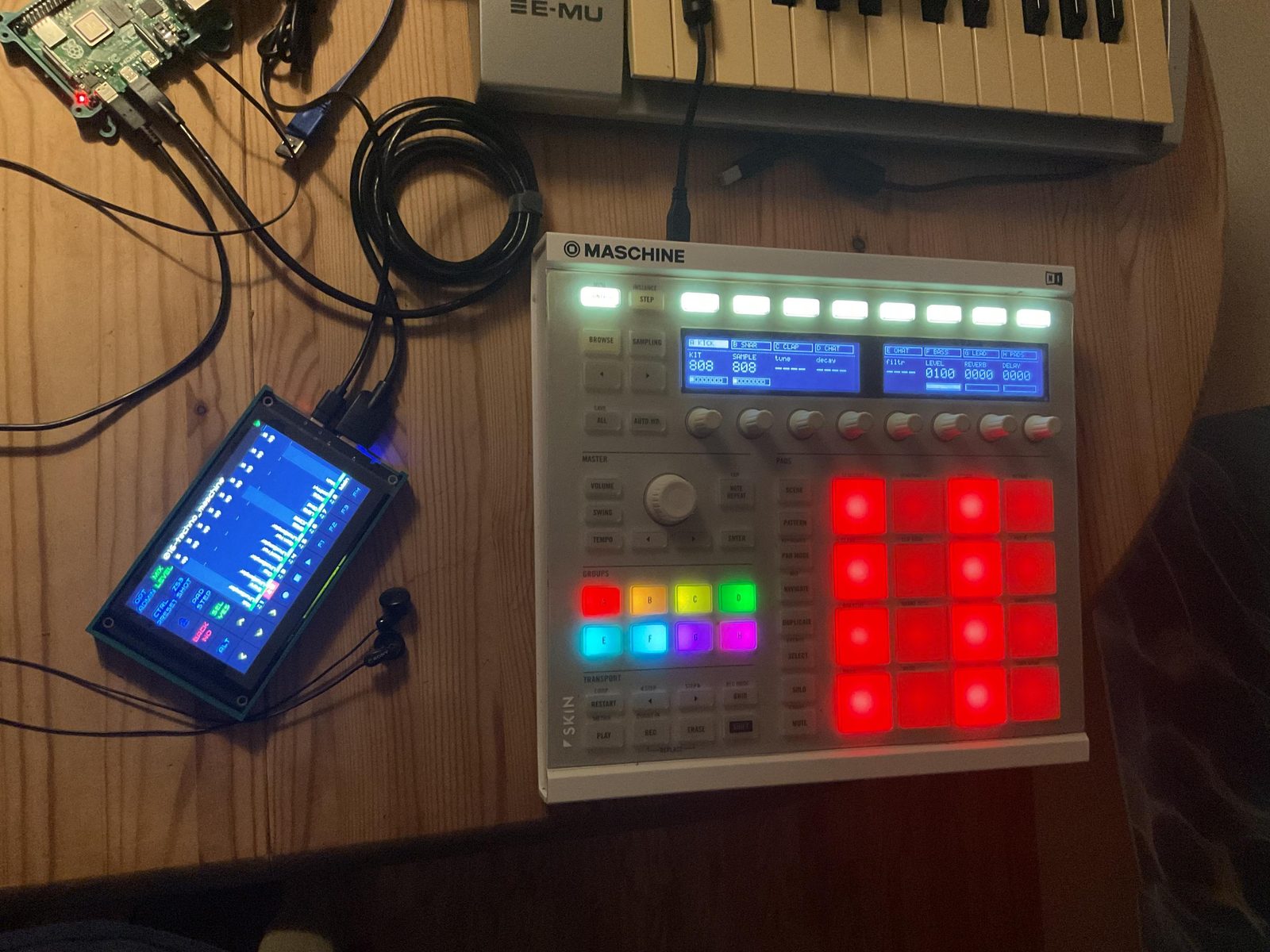
Eight channels building themselves out of silence: euclidean drums dialled in, a shift register writing a bassline and then locking it, six bar-synced LFOs moving the sound, and cellular automata taking over the rhythm. The two chord parts are hand-played takes the generator refuses to overwrite.
Forty minutes,
measured
One command. No soldering, no config files, no DAW. Ten minutes of the forty is this project's part; the other thirty is Zynthian installing itself while you make coffee.
Flash and first boot
Write the ZynthianOS image to the SD card and let the Pi come up.
bootstrap.sh
One command on the Pi. It fetches the driver, installs it and places the factory snapshot.
Playing
Load the snapshot, press play, turn HITS. That is the whole ceremony.
The first boot looks broken. It is not.Zynthian's first boot is an initialisation pass: slow, and the touchscreen misbehaves while it runs. Wait it out — this is the one step worth being warned about, so here is the warning.
Euclid on the drums,
a shift register on the voices
Generative is the default mode here, not a feature buried in a menu. The five drum channels are euclidean: hits spread as evenly as the grid allows, then rotate. Four hits in sixteen is four-on-the-floor; five is the clave. You turn HITS and ROTATE and listen.
Step 0 is the top-left pad. Drag a knob — the pattern is rewritten underneath you, not redrawn by hand.
Then pick a group — A to H — and turn HITS and ROTATE to dial that channel's rhythm in. The other seven keep playing.
The three voices are Turing machines. Each owns a shift register, clocked once per pass and mutated with probability MELODY, and the register's value becomes pitch. Set MELODY to zero and the loop you are hearing freezes bit for bit, for as long as you leave it there. Pick F BASS, G LEAD or H PADS and the pads stop being a beat and start being a line.
The display reads LOCK, not a numberBecause a number could be a coincidence. When randomness is zero the readout says so in a word.
- Notes are realThe driver writes into Zynthian's own sequencer, so patterns persist in snapshots and the touchscreen editor mirrors what the pads show.
- Always aliveEight channels, nothing created or torn down mid-jam. The instrument never asks a question while you are playing.
- Skill floorNo step entry, no pattern programming, no music theory. The floor is near zero; the ceiling is not.
- OverdubHold REC and play. Recording adds on top — it does not overwrite — and played-in steps light amber.
- Silence explains itselfA dashed tab means that channel is not sounding. Read the tab row before assuming a fault.
Nothing has to stay still,
and it is still moving tomorrow
Hold MOD and every encoder stops setting a value and starts setting how that value moves. Not a mode, not a page — the same knobs you already know, given a second dimension where they sit. Cutoff, resonance, level, the sends, and every port a plugin publishes, down to a synth's fortieth parameter.
Each one runs on its own clock, so binding eight across the levels makes the row breathe rather than pump. They are written into the snapshot with their depth, rate, shape and position — load the set tomorrow and they are still running, from the value you set rather than wherever the sweep happened to stop.
- Four shapesTriangle, ramp, square and sample-and-hold.
- Locked to the barNine rates, sixteen bars down to half a bar, so nothing drifts out of time with the pattern.
- Takes are safeIt refuses any verb that rewrites the pattern, so a recorded overdub cannot be modulated away.
- Costs nothingNo plugin instances, and nothing is created or torn down while you play.
Eight channels,
four modes, no song mode
Drums are warm colours and voices are cool, so the seam between the halves is visible on the panel without reading anything.
| Mode | What the eight encoders do |
|---|---|
| CONTROL · drum | KIT, SAMPLE, RANGE, then LEVEL, REVERB, DELAY |
| CONTROL · voice | PRESET, CUTOFF, RESO, ENV, DECAY, LEVEL, REVERB, DELAY |
| STEP · drum | HITS, ROTATE, DIVIDE, LENGTH, VELO, CHANCE, RATCH, SWING |
| STEP · voice | DIVIDE, LENGTH, GATE, OCTAVE, RANGE, VELO, CHANCE, SWING |
| AUTO · drum | RULE, LEAN, RHYTHM, LANE, MOVE, PHRASE, FILL, EXIT |
| AUTO · voice | RULE, MODEL, MELODY, RHYTHM, MOVE, PHRASE, FILL, EXIT |
| VOLUME | ROOT, SCALE, BPM, WALK, SPAN, MASTER, REVSIZE, DLYTIME |
| ALL, held | whichever verb your hand last moved, across all eight channels at once |
One rule for every modifierNine buttons put something else on the pads — odds, macros, banks, mutes, modulation, the phrase page. All nine obey the same rule and there are no exceptions: a tap latches it, a hold borrows it, and a second tap is always the way out. The button says which you are in — steady while your finger is on it, blinking once it can carry on without you.
And one button backPress the big encoder and you are home: STEP, first page, every latch dropped, the pads showing what the selected channel is playing. Your channel stays selected and nothing you armed is cancelled — it is navigation, not a deletion. It is the biggest, most central control on the panel because you have to be able to find it without looking.
What it is notNo song mode, no pattern chaining, no sampling. It is an instrument for playing a single evolving pattern, not a workstation for arranging one. Snapshots restore a whole jam state, so the good one is not something you can lose — and SHIFT + REC captures the jam itself to a WAV.
One power supply
is the whole power story
The Pi feeds itself and the controller runs off the Pi. That is the entire cabling diagram: one supply in, one USB cable across, headphones out. Put the supply on a USB powerbank and the instrument runs on a park bench.
Two objects in a bag. Setup time is unpacking time. Hands stay on pads and encoders and the laptop stays at home — the absence of a computer is part of the point.
- Power inOne PSU, or a USB powerbank.
- Between themOne USB cable, Pi to controller.
- Audio outThe Pi's headphone jack at 48 kHz. An external interface is optional and will sound better.
- ScreenAny HDMI monitor works for Zynthian's own UI. A touchscreen is nicer to play but is not needed to install.
- It growsThe same box takes touchscreens, multitrack USB interfaces and more MIDI gear. The ceiling is the platform's ceiling.
An instrument that will
never stop playing for you
It is built on Zynthian, a maintained open-source synth platform with an active community and official hardware kits if a boxed version is ever wanted. Every line is readable, every part swappable, all of it yours to fork.
It cannot be discontinuedNo vendor can brick it with a firmware update or close a store it depends on. The controller it runs on was already discontinued — that is exactly why it was available.
- Cloud
----None. Nothing is uploaded. - Account
----None to create, none to lose. - Subscription
----No licence, no renewal. Buy the parts once. - Telemetry
----None. - NetworkNeeded during installation. After that it plays offline — a bunker, a train, a field.